
Archive and delete cases
Our deletion and archiving options give you the flexibility to manage your cases in a way that best suits your needs and internal data policies.
Archive a case
If a case is no longer relevant but you still wish to keep the data for future reference, you can choose to archive it. Archived cases are removed from your active list but remain in the system.
How to do it:
Individually: Go to Cases, click the three dots (⋮) next to the case, and select Archive case.
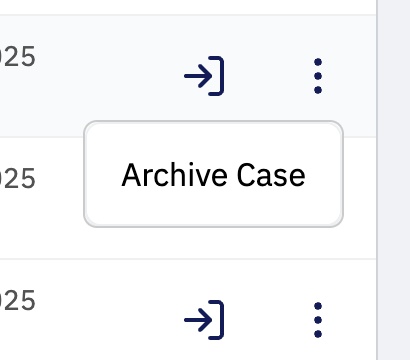
Bulk action: Select the cases you wish to remove using the checkboxes on the left and click the blue Archive button in the top menu.

Restore a case
If a case has been archived by mistake, or if a process needs to be resumed, you can restore it at any time. Restoring a case makes it active again, bringing back all associated data, documents, and entities to your main overview.
How to do it:
Go to Cases and switch to the Archived tab.
Individually: Click the three dots (⋮) and select Restore Case.
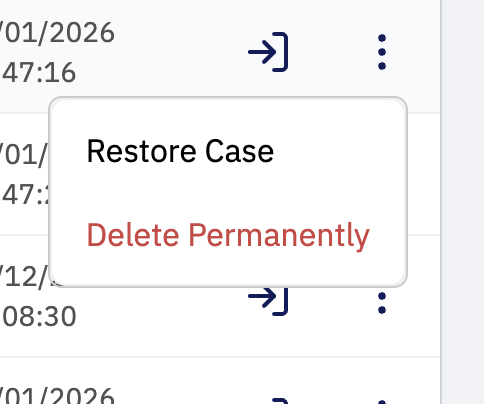
Bulk action: Mark the cases and click the Restore button in the top left corner.

Delete a case permanently
Once a case is archived, you can choose to delete it permanently.
Important: This will permanently remove all data and information associated with the case. This action cannot be undone.
How to do it:
Go to Cases and switch to the Archived tab.
Individually: Click the three dots (⋮) and select Delete Permanently.
Bulk action: Mark the cases and click the Delete button in the top right corner.

Unsure about deleting?
Remember, deletion is permanent. If you’re unsure whether you’ll need the data again, we always recommend using Archive instead. If you have questions about data management, we’re ready to help in the chat or at support@uniify.io.